
If you’ve ever experienced wrist pain, tingling fingers, or tightness in your forearm after hours spent hunched over the computer, know that you’re not alone. Many people experience discomfort from using a regular mouse over extended periods, and over time that strain can turn into more serious issues like carpal tunnel syndrome.
With so many making the switch to ergo mouses specially designed to support natural hand positions and thus reduce tension on the muscles-it begs the question: Are they really worth it? Simple answer: yes. Once you make the switch, you’ll likely wonder why you didn’t do it sooner.
What’s an Ergonomic Mouse?
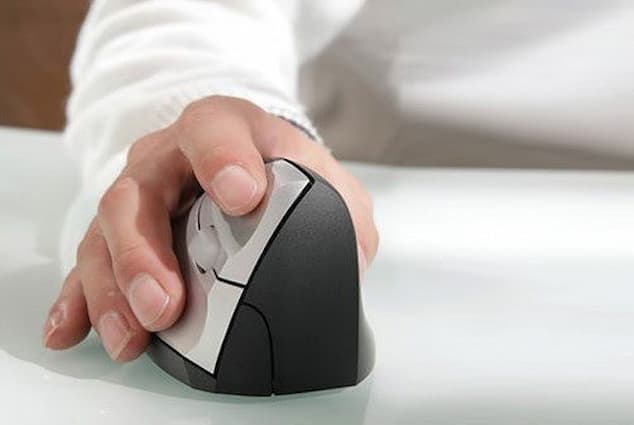
This is a computer mouse designed to promote a more natural posture when working. Traditional mice force your hand into a flat position, which may strain your wrist and forearm. Over time, this position puts pressure on nerves and tendons and causes fatigue and discomfort.
As opposed to them, the high-quality ergo mouses are designed to support your hand in a more relaxed, neutral position. For this reason, the primary function of an ergo mouse is to reduce those minute, repetitive motions that can cause problems in the long run. Many of these mice are contoured to fit the natural curve of your hand, reducing the effort required to click, scroll, or move the on-screen pointer.
A few of them even allow for adjustments in angle and height for customisation to fit the needs of their users. They’re particularly popular among individuals who spend most of their day working at desks-either in offices, homes, or creative studios. Casual computer users can also benefit from the improved comfort and better posture that an ergonomic design offers.
Types of Ergonomic Mice
Not all ergo mоuses are the same. The device designs differ to meet particular needs and preferences, which is good because no two hands are alike. One of the most common types is the vertical. Its name indicates that it keeps the hand in a vertical rather than flat position against the desk.
This position mimics a natural handshake and keeps the wrist in a more neutral position, reducing the twisting action and creating strain. Many people who have pain in the wrist and/or forearm find relief once they switch to a vertical mouse since it takes pressure off the median nerve, which is commonly affected by carpal tunnel syndrome.
Another popular style is the Newtral mouse, which incorporates the vertical concept with a comfortable hand rest. This allows your fingers to relax while keeping support for the palm; hence, it has been in demand from users who feel tension and fatigue in their hands. Neutral design helps distribute pressure across your hand and wrist better, preventing any stress in just one area.
Then there’s the roller mouse, which is a completely different approach altogether. Instead of moving a mouse around your desk, the roller mouse sits in front of your keyboard and uses a roller bar that you control with your fingers or thumbs. This design keeps your hands close to the centre of your workspace, reducing reaching and repetitive side movements.
Last but not least, the DXT mouse is another interesting option. It’s smaller and more compact, designed to be held delicately between your thumb and fingers, promoting micro-movements rather than large wrist motions. This mouse is especially suited for people who want more precision or for those with smaller hands who find larger ergonomic models uncomfortable.
Benefits
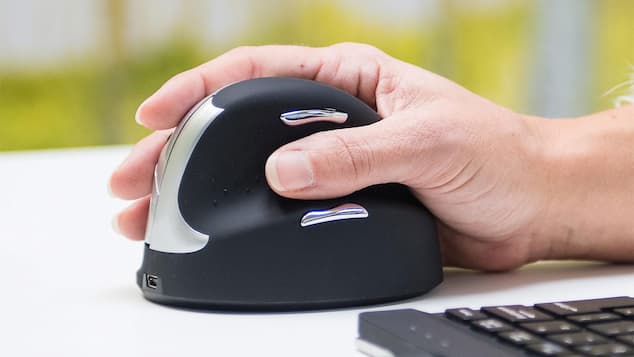
The main benefit of this kind of mouse is rather simple: comfort. But there’s more to it than just feeling good. Using a mouse designed for ergonomics helps prevent long-term strain injuries that can result from years of repetitive use. It reduces the stress on muscles, tendons, and nerves by keeping your hand and wrist in their natural position.
Improved posture is another big plus. Most traditional mice eventually lead to slouching or awkward desk setups as you unconsciously adjust your position to get comfortable. An ergonomic model encourages a more upright posture, correctly aligning your hand, wrist, and forearm. Over time, this can even help reduce shoulder and neck pain-issues that often result from poor alignment at your desk.
Ergonomic mice can also improve productivity. When your hand is relaxed and supported, you are less likely to take breaks due to discomfort or stiffness. Movements will be much smoother and more precise, especially for detailed work, such as graphic design or photo editing. Many users reported less tiredness at the end of the day after switching to an ergonomic design, simply because their hands and wrists are not working so hard.
Another often underrated advantage of ergo mouses is that many of them offer custom buttons and sensitivity settings. You are able to program the shortcuts for your most frequently used functions, which reduces the need for extra movements, therefore making you work more efficiently.
When you think about it, this investment is one of the simplest and most effective ways to make your workspace healthier. It supports the body’s natural alignment, reduces strain, and helps prevent the aches and pains so many people accept as part of daily computer use. The best part is, you don’t need to be some sort of tech guru or break the bank to get one.



Comments are closed.